> ## Documentation Index
> Fetch the complete documentation index at: https://docs-dev-fix-update-domain-refs.mintlify.site/llms.txt
> Use this file to discover all available pages before exploring further.

> Learn how to configure an update policy form using Forms for Actions for users to review and accept new terms of service or consent updates.

# Use Cases: Configure an update policy form using Forms

<Card title="Before you start">
  1. Create a [Machine-to-Machine Application](/docs/get-started/auth0-overview/create-applications/machine-to-machine-apps) with the following scopes enabled:

  * `read:users`
  * `update:users`
  * `create:users`
  * `read:users_app_metadata`
  * `update:users_app_metadata`
  * `create:users_app_metadata`

  2. Add a [Vault connection](/docs/customize/forms/vault) using the M2M application credentials.
</Card>

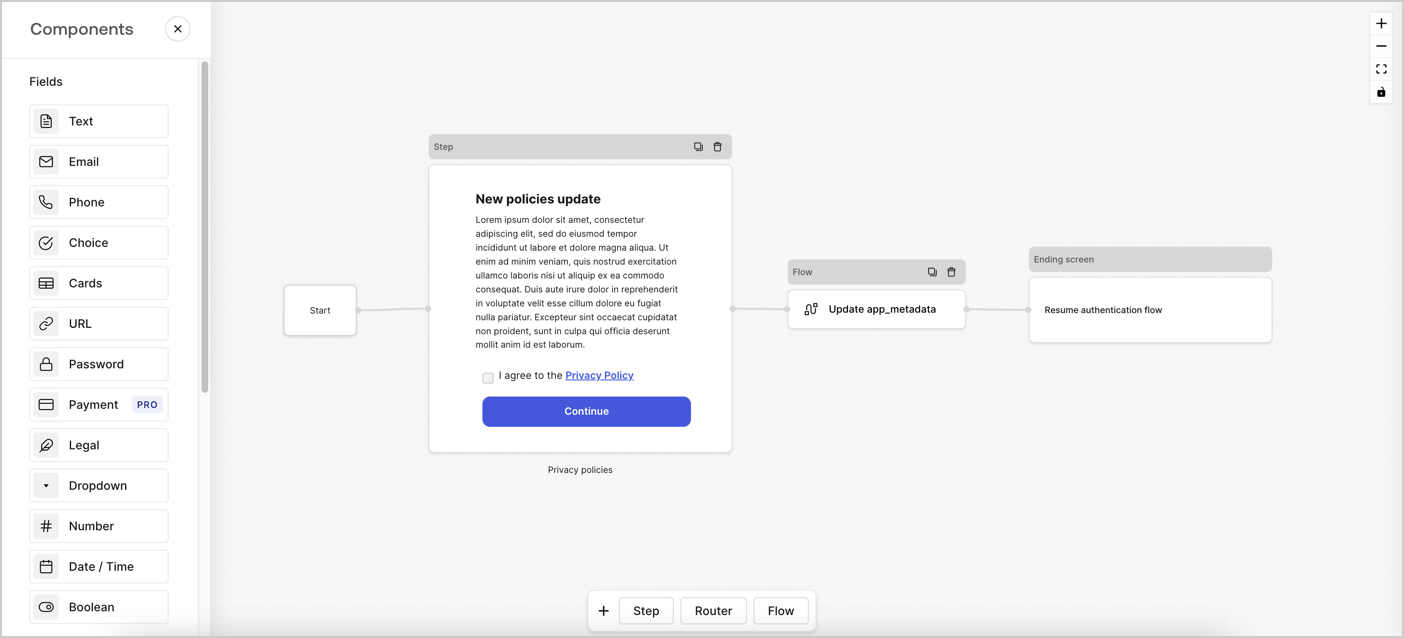
Forms for Actions allows you to create custom privacy policies flows and store the consent under the `app_metadata` object.
<Frame>
  <img src="https://mintcdn.com/docs-dev-fix-update-domain-refs/Q1aCvgCTL-q_Gw15/docs/images/cdy7uua7fh8z/6i68dMvHDTijfRmSgN1x8Q/ad900e7d4c0fb34645921435472b8684/privavy-policy-form.png?fit=max&auto=format&n=Q1aCvgCTL-q_Gw15&q=85&s=ab5745a67dd40ca29d5b489a3e989baf" alt="Dashboard > Actions > Forms > Privacy policy use case" data-og-width="1404" width="1404" data-og-height="638" height="638" data-path="docs/images/cdy7uua7fh8z/6i68dMvHDTijfRmSgN1x8Q/ad900e7d4c0fb34645921435472b8684/privavy-policy-form.png" data-optimize="true" data-opv="3" srcset="https://mintcdn.com/docs-dev-fix-update-domain-refs/Q1aCvgCTL-q_Gw15/docs/images/cdy7uua7fh8z/6i68dMvHDTijfRmSgN1x8Q/ad900e7d4c0fb34645921435472b8684/privavy-policy-form.png?w=280&fit=max&auto=format&n=Q1aCvgCTL-q_Gw15&q=85&s=2ff33bd657d7087657eecb0dad25641f 280w, https://mintcdn.com/docs-dev-fix-update-domain-refs/Q1aCvgCTL-q_Gw15/docs/images/cdy7uua7fh8z/6i68dMvHDTijfRmSgN1x8Q/ad900e7d4c0fb34645921435472b8684/privavy-policy-form.png?w=560&fit=max&auto=format&n=Q1aCvgCTL-q_Gw15&q=85&s=263a39a8e6c6ebc197023bc11eab3636 560w, https://mintcdn.com/docs-dev-fix-update-domain-refs/Q1aCvgCTL-q_Gw15/docs/images/cdy7uua7fh8z/6i68dMvHDTijfRmSgN1x8Q/ad900e7d4c0fb34645921435472b8684/privavy-policy-form.png?w=840&fit=max&auto=format&n=Q1aCvgCTL-q_Gw15&q=85&s=0fafe95d0124e67458dbaacf46cb1707 840w, https://mintcdn.com/docs-dev-fix-update-domain-refs/Q1aCvgCTL-q_Gw15/docs/images/cdy7uua7fh8z/6i68dMvHDTijfRmSgN1x8Q/ad900e7d4c0fb34645921435472b8684/privavy-policy-form.png?w=1100&fit=max&auto=format&n=Q1aCvgCTL-q_Gw15&q=85&s=e6030e76d7044aa841b0c73d34cce735 1100w, https://mintcdn.com/docs-dev-fix-update-domain-refs/Q1aCvgCTL-q_Gw15/docs/images/cdy7uua7fh8z/6i68dMvHDTijfRmSgN1x8Q/ad900e7d4c0fb34645921435472b8684/privavy-policy-form.png?w=1650&fit=max&auto=format&n=Q1aCvgCTL-q_Gw15&q=85&s=9df42e2a5306e9cb4e0fb9105ef3ef61 1650w, https://mintcdn.com/docs-dev-fix-update-domain-refs/Q1aCvgCTL-q_Gw15/docs/images/cdy7uua7fh8z/6i68dMvHDTijfRmSgN1x8Q/ad900e7d4c0fb34645921435472b8684/privavy-policy-form.png?w=2500&fit=max&auto=format&n=Q1aCvgCTL-q_Gw15&q=85&s=dbb02981bc1543e928bad57b87165998 2500w" />
</Frame>

The sections below outline how you can create an Update Policy form using nodes and flows, along with steps for adding your form to a [Post Login](/docs/customize/actions/explore-triggers/signup-and-login-triggers/login-trigger) Action.

## Create a form from scratch

Follow these steps to create a form to gather information:

1. Open the Form editor by selecting **Auth0 Dashboard > Actions > Forms.**
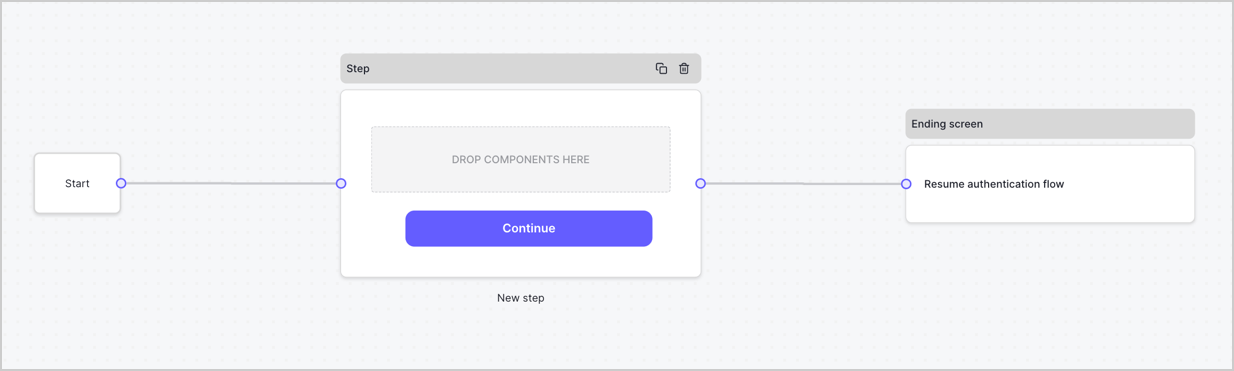
2. Select **Create Form** > **Start from scratch**.

By default, a new form contains a Start node, a Step node, and an Ending screen node.
<Frame>
  <img src="https://mintcdn.com/docs-dev-fix-update-domain-refs/F5Lk5bYdFgUBZwvT/docs/images/cdy7uua7fh8z/2TZ9jSjgEcARFpULI6hz4R/a4319a1bd482f2ee5cc23100fdb2f42c/New-form-Forms-for-action-use-case.png?fit=max&auto=format&n=F5Lk5bYdFgUBZwvT&q=85&s=e8cb348da6bf6c7ff43f7f176d0a91e5" alt="Dashboard > Forms > Use Cases > Form" data-og-width="1234" width="1234" data-og-height="371" height="371" data-path="docs/images/cdy7uua7fh8z/2TZ9jSjgEcARFpULI6hz4R/a4319a1bd482f2ee5cc23100fdb2f42c/New-form-Forms-for-action-use-case.png" data-optimize="true" data-opv="3" srcset="https://mintcdn.com/docs-dev-fix-update-domain-refs/F5Lk5bYdFgUBZwvT/docs/images/cdy7uua7fh8z/2TZ9jSjgEcARFpULI6hz4R/a4319a1bd482f2ee5cc23100fdb2f42c/New-form-Forms-for-action-use-case.png?w=280&fit=max&auto=format&n=F5Lk5bYdFgUBZwvT&q=85&s=8b644f189a1304169377ff17bac8a44b 280w, https://mintcdn.com/docs-dev-fix-update-domain-refs/F5Lk5bYdFgUBZwvT/docs/images/cdy7uua7fh8z/2TZ9jSjgEcARFpULI6hz4R/a4319a1bd482f2ee5cc23100fdb2f42c/New-form-Forms-for-action-use-case.png?w=560&fit=max&auto=format&n=F5Lk5bYdFgUBZwvT&q=85&s=7c680a766c9797f95719c9e7a2c0c13d 560w, https://mintcdn.com/docs-dev-fix-update-domain-refs/F5Lk5bYdFgUBZwvT/docs/images/cdy7uua7fh8z/2TZ9jSjgEcARFpULI6hz4R/a4319a1bd482f2ee5cc23100fdb2f42c/New-form-Forms-for-action-use-case.png?w=840&fit=max&auto=format&n=F5Lk5bYdFgUBZwvT&q=85&s=50e5aa75c2d0b703b89f78e8774d2d0f 840w, https://mintcdn.com/docs-dev-fix-update-domain-refs/F5Lk5bYdFgUBZwvT/docs/images/cdy7uua7fh8z/2TZ9jSjgEcARFpULI6hz4R/a4319a1bd482f2ee5cc23100fdb2f42c/New-form-Forms-for-action-use-case.png?w=1100&fit=max&auto=format&n=F5Lk5bYdFgUBZwvT&q=85&s=9a65f713ac18e878a7aed4dd90b71231 1100w, https://mintcdn.com/docs-dev-fix-update-domain-refs/F5Lk5bYdFgUBZwvT/docs/images/cdy7uua7fh8z/2TZ9jSjgEcARFpULI6hz4R/a4319a1bd482f2ee5cc23100fdb2f42c/New-form-Forms-for-action-use-case.png?w=1650&fit=max&auto=format&n=F5Lk5bYdFgUBZwvT&q=85&s=3293ae7d9a90fe84c5a9d08be2921e7f 1650w, https://mintcdn.com/docs-dev-fix-update-domain-refs/F5Lk5bYdFgUBZwvT/docs/images/cdy7uua7fh8z/2TZ9jSjgEcARFpULI6hz4R/a4319a1bd482f2ee5cc23100fdb2f42c/New-form-Forms-for-action-use-case.png?w=2500&fit=max&auto=format&n=F5Lk5bYdFgUBZwvT&q=85&s=26ff21f5f4fcd7e89c2b38274010de68 2500w" />
</Frame>

### Configure the Step node

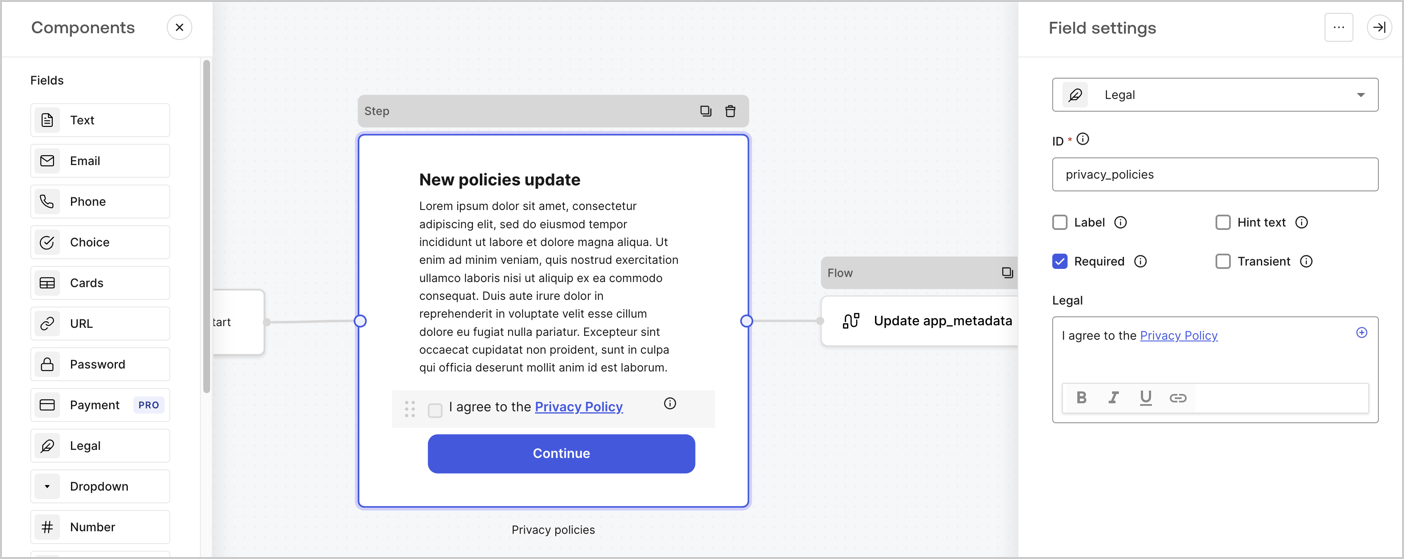
The Step node is the graphical interface visible to users. Add [Fields](/docs/customize/forms/nodes-and-components) to the Step node to collect the new agreement acceptance value by following these steps:

1. Drag a **Rich text** field from the **Components menu** into the **Step** node.

   * **Rich text**: Enter a description of your privacy policies updates.
   * Select **Save**.
2. Drag a **Legal** field into the **Step** node.

   * **ID**: Enter `privacy_policies`.
   * **Required**: Enable the checkbox.
   * **Legal**: Enter `I agree to the Privacy Policy`.
   * Select **Save**.
3. Select **Publish** to save.
<Frame>
  <img src="https://mintcdn.com/docs-dev-fix-update-domain-refs/nVZdUS37vnHYjO5u/docs/images/cdy7uua7fh8z/59zFFjQjAnjogkc2QGIqqJ/0ad66b1b636544122aa4e65968b76c2c/privacy-policy-step-node.png?fit=max&auto=format&n=nVZdUS37vnHYjO5u&q=85&s=e5b5cba46c18dc9c3bb01f5ab39a31aa" alt="Dashboard > Actions > Forms > Use case privacy policy step node" data-og-width="1404" width="1404" data-og-height="559" height="559" data-path="docs/images/cdy7uua7fh8z/59zFFjQjAnjogkc2QGIqqJ/0ad66b1b636544122aa4e65968b76c2c/privacy-policy-step-node.png" data-optimize="true" data-opv="3" srcset="https://mintcdn.com/docs-dev-fix-update-domain-refs/nVZdUS37vnHYjO5u/docs/images/cdy7uua7fh8z/59zFFjQjAnjogkc2QGIqqJ/0ad66b1b636544122aa4e65968b76c2c/privacy-policy-step-node.png?w=280&fit=max&auto=format&n=nVZdUS37vnHYjO5u&q=85&s=98d9cee793f001a18d225a3e54cce59d 280w, https://mintcdn.com/docs-dev-fix-update-domain-refs/nVZdUS37vnHYjO5u/docs/images/cdy7uua7fh8z/59zFFjQjAnjogkc2QGIqqJ/0ad66b1b636544122aa4e65968b76c2c/privacy-policy-step-node.png?w=560&fit=max&auto=format&n=nVZdUS37vnHYjO5u&q=85&s=f3dfe8b2edfe9a31ec54f11da3bf215b 560w, https://mintcdn.com/docs-dev-fix-update-domain-refs/nVZdUS37vnHYjO5u/docs/images/cdy7uua7fh8z/59zFFjQjAnjogkc2QGIqqJ/0ad66b1b636544122aa4e65968b76c2c/privacy-policy-step-node.png?w=840&fit=max&auto=format&n=nVZdUS37vnHYjO5u&q=85&s=a9fbe8515277f84a227ee6b167418f98 840w, https://mintcdn.com/docs-dev-fix-update-domain-refs/nVZdUS37vnHYjO5u/docs/images/cdy7uua7fh8z/59zFFjQjAnjogkc2QGIqqJ/0ad66b1b636544122aa4e65968b76c2c/privacy-policy-step-node.png?w=1100&fit=max&auto=format&n=nVZdUS37vnHYjO5u&q=85&s=fbeedbcfca32fc0051b6452147a5753d 1100w, https://mintcdn.com/docs-dev-fix-update-domain-refs/nVZdUS37vnHYjO5u/docs/images/cdy7uua7fh8z/59zFFjQjAnjogkc2QGIqqJ/0ad66b1b636544122aa4e65968b76c2c/privacy-policy-step-node.png?w=1650&fit=max&auto=format&n=nVZdUS37vnHYjO5u&q=85&s=1dc9e778a539edea28f7f608e26e21cd 1650w, https://mintcdn.com/docs-dev-fix-update-domain-refs/nVZdUS37vnHYjO5u/docs/images/cdy7uua7fh8z/59zFFjQjAnjogkc2QGIqqJ/0ad66b1b636544122aa4e65968b76c2c/privacy-policy-step-node.png?w=2500&fit=max&auto=format&n=nVZdUS37vnHYjO5u&q=85&s=60b89aec843d30430d5440d3c94299e7 2500w" />
</Frame>

### Configure the Flow node

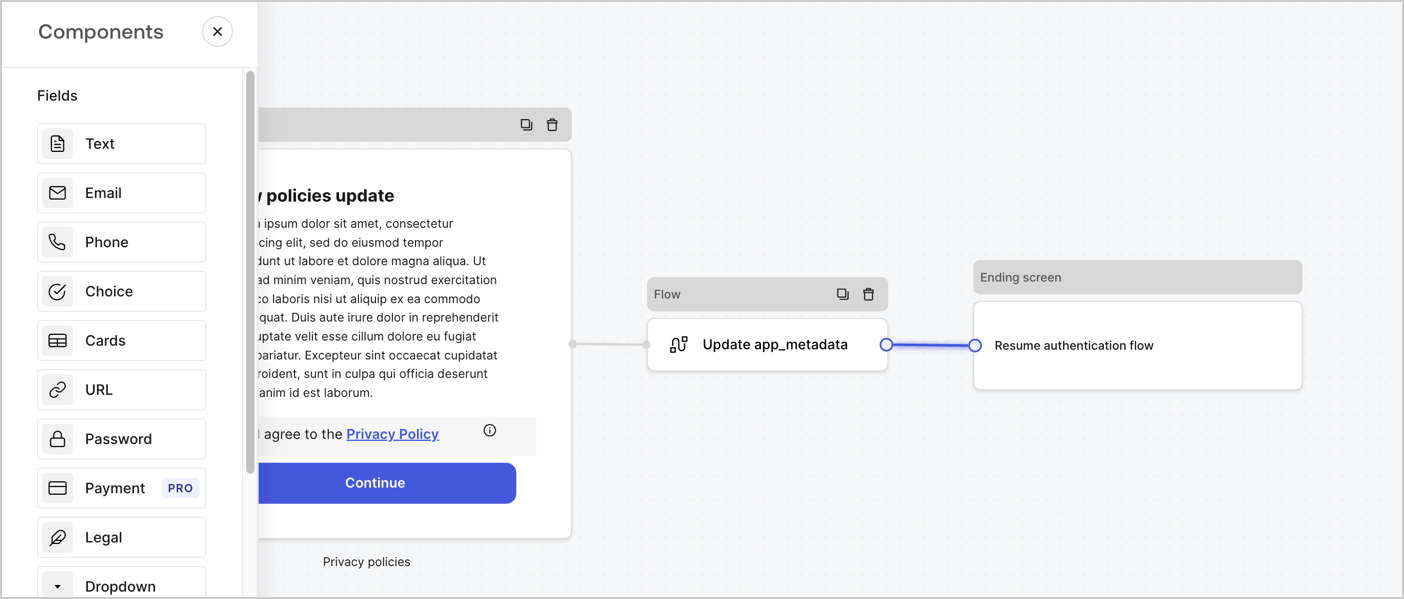
Add a **Flow** node after the **Step** node to update the `app_metadata` and resume the authentication flow by following these steps:

1. Select **Flow** from the bottom of the Form editor.
2. Remove the existing link between the **Step** and **Ending Screen** nodes.
3. Select the new **Flow** > **Click to add a flow** > **Create a new flow.**

   * Enter `Update app_metadata` in the **Name** field.
   * Select **Create**.
   * Select **Save**.
4. Link the **Flow** node to the **Step** and **Ending Screen** nodes as pictured below.
5. Select **Publish** to save.
<Frame>
  <img src="https://mintcdn.com/docs-dev-fix-update-domain-refs/Q1aCvgCTL-q_Gw15/docs/images/cdy7uua7fh8z/6YIkzm7SrpM9LW76AXuRzh/353c518fe82bbaa440836da1d83596d6/link-policies.png?fit=max&auto=format&n=Q1aCvgCTL-q_Gw15&q=85&s=88906a1b6276bea4c08fa8cf0915bc36" alt="Dashboard > Actions > Forms > Form" data-og-width="1404" width="1404" data-og-height="599" height="599" data-path="docs/images/cdy7uua7fh8z/6YIkzm7SrpM9LW76AXuRzh/353c518fe82bbaa440836da1d83596d6/link-policies.png" data-optimize="true" data-opv="3" srcset="https://mintcdn.com/docs-dev-fix-update-domain-refs/Q1aCvgCTL-q_Gw15/docs/images/cdy7uua7fh8z/6YIkzm7SrpM9LW76AXuRzh/353c518fe82bbaa440836da1d83596d6/link-policies.png?w=280&fit=max&auto=format&n=Q1aCvgCTL-q_Gw15&q=85&s=83793776f5f78ebf25c4d9584fb9f5c0 280w, https://mintcdn.com/docs-dev-fix-update-domain-refs/Q1aCvgCTL-q_Gw15/docs/images/cdy7uua7fh8z/6YIkzm7SrpM9LW76AXuRzh/353c518fe82bbaa440836da1d83596d6/link-policies.png?w=560&fit=max&auto=format&n=Q1aCvgCTL-q_Gw15&q=85&s=77b3f42e78e2daf05488004da7db1e87 560w, https://mintcdn.com/docs-dev-fix-update-domain-refs/Q1aCvgCTL-q_Gw15/docs/images/cdy7uua7fh8z/6YIkzm7SrpM9LW76AXuRzh/353c518fe82bbaa440836da1d83596d6/link-policies.png?w=840&fit=max&auto=format&n=Q1aCvgCTL-q_Gw15&q=85&s=21b365bd225724d9caeb2d01d9304f9b 840w, https://mintcdn.com/docs-dev-fix-update-domain-refs/Q1aCvgCTL-q_Gw15/docs/images/cdy7uua7fh8z/6YIkzm7SrpM9LW76AXuRzh/353c518fe82bbaa440836da1d83596d6/link-policies.png?w=1100&fit=max&auto=format&n=Q1aCvgCTL-q_Gw15&q=85&s=88c02837f5427bdb35e3cabdf86e7c4d 1100w, https://mintcdn.com/docs-dev-fix-update-domain-refs/Q1aCvgCTL-q_Gw15/docs/images/cdy7uua7fh8z/6YIkzm7SrpM9LW76AXuRzh/353c518fe82bbaa440836da1d83596d6/link-policies.png?w=1650&fit=max&auto=format&n=Q1aCvgCTL-q_Gw15&q=85&s=5336e639f17fb4a9a5d4a1645c3c6d0f 1650w, https://mintcdn.com/docs-dev-fix-update-domain-refs/Q1aCvgCTL-q_Gw15/docs/images/cdy7uua7fh8z/6YIkzm7SrpM9LW76AXuRzh/353c518fe82bbaa440836da1d83596d6/link-policies.png?w=2500&fit=max&auto=format&n=Q1aCvgCTL-q_Gw15&q=85&s=3eba577038f4e9272df157a2f022b291 2500w" />
</Frame>

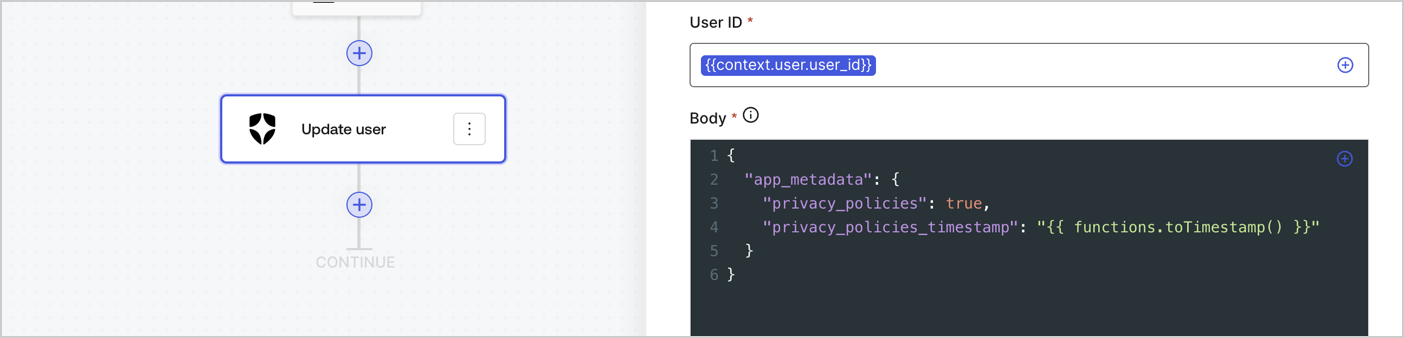
Add an Auth0 Update user action to the flow by following these steps:

1. Select the **Flow** **Update app\_metadata** > **Edit flow** to open the Flow editor in a new tab.
2. Below the StartAction, select the **+** icon to add an **Update user** action. Complete the fields below, then select **Save** to continue.

   * **Connection**: Select from the dropdown the Vault connection to your M2M application.

   * **User ID**: Enter `{{context.user.user_id}}`.

   * **Body**: Copy and paste the following code to update the app\_metadata with the privacy\_policies and privacy\_policies\_timestamp properties.

     ```text lines theme={null}
     {
       "app_metadata": {
         "privacy_policies": true,
         "privacy_policies_timestamp": "{{ functions.toTimestamp() }}"
       }
     }
     ```

   * Select **Save**.
3. Select **Publish** to save.
<Frame>
  <img src="https://mintcdn.com/docs-dev-fix-update-domain-refs/6C89plG_z0zoeiWW/docs/images/cdy7uua7fh8z/CvMNIwWrOUwaFW4X3G28p/1fb70ae57a20749d9ffaaba8dc0b7e26/update-user-privacy.png?fit=max&auto=format&n=6C89plG_z0zoeiWW&q=85&s=bc9174defe69f2875518c06930a2940c" alt="Dashboard > Actions > Forms > User case privacy policy code" data-og-width="1404" width="1404" data-og-height="338" height="338" data-path="docs/images/cdy7uua7fh8z/CvMNIwWrOUwaFW4X3G28p/1fb70ae57a20749d9ffaaba8dc0b7e26/update-user-privacy.png" data-optimize="true" data-opv="3" srcset="https://mintcdn.com/docs-dev-fix-update-domain-refs/6C89plG_z0zoeiWW/docs/images/cdy7uua7fh8z/CvMNIwWrOUwaFW4X3G28p/1fb70ae57a20749d9ffaaba8dc0b7e26/update-user-privacy.png?w=280&fit=max&auto=format&n=6C89plG_z0zoeiWW&q=85&s=6b4ed9c4ec64c7319fbf3c549772ad4a 280w, https://mintcdn.com/docs-dev-fix-update-domain-refs/6C89plG_z0zoeiWW/docs/images/cdy7uua7fh8z/CvMNIwWrOUwaFW4X3G28p/1fb70ae57a20749d9ffaaba8dc0b7e26/update-user-privacy.png?w=560&fit=max&auto=format&n=6C89plG_z0zoeiWW&q=85&s=daeabc0ad6cb45c782707cf6db17177b 560w, https://mintcdn.com/docs-dev-fix-update-domain-refs/6C89plG_z0zoeiWW/docs/images/cdy7uua7fh8z/CvMNIwWrOUwaFW4X3G28p/1fb70ae57a20749d9ffaaba8dc0b7e26/update-user-privacy.png?w=840&fit=max&auto=format&n=6C89plG_z0zoeiWW&q=85&s=a8951d87f0bb2877a56a77f54123608c 840w, https://mintcdn.com/docs-dev-fix-update-domain-refs/6C89plG_z0zoeiWW/docs/images/cdy7uua7fh8z/CvMNIwWrOUwaFW4X3G28p/1fb70ae57a20749d9ffaaba8dc0b7e26/update-user-privacy.png?w=1100&fit=max&auto=format&n=6C89plG_z0zoeiWW&q=85&s=0d137bd92d5895c230180b2634108cb6 1100w, https://mintcdn.com/docs-dev-fix-update-domain-refs/6C89plG_z0zoeiWW/docs/images/cdy7uua7fh8z/CvMNIwWrOUwaFW4X3G28p/1fb70ae57a20749d9ffaaba8dc0b7e26/update-user-privacy.png?w=1650&fit=max&auto=format&n=6C89plG_z0zoeiWW&q=85&s=9134a983873c03101144adc95ca3b7d0 1650w, https://mintcdn.com/docs-dev-fix-update-domain-refs/6C89plG_z0zoeiWW/docs/images/cdy7uua7fh8z/CvMNIwWrOUwaFW4X3G28p/1fb70ae57a20749d9ffaaba8dc0b7e26/update-user-privacy.png?w=2500&fit=max&auto=format&n=6C89plG_z0zoeiWW&q=85&s=3c723906cce2e42a84a7bb008c1c8fb5 2500w" />
</Frame>

<Callout icon="file-lines" color="#0EA5E9" iconType="regular">
  The flow **Update app\_metadata** adds a `privacy_policies true` value to the app`_metadata` object and also generates a timestamp with a [helper function.](/docs/customize/forms/variables)
</Callout>

## Retrieve the form render code

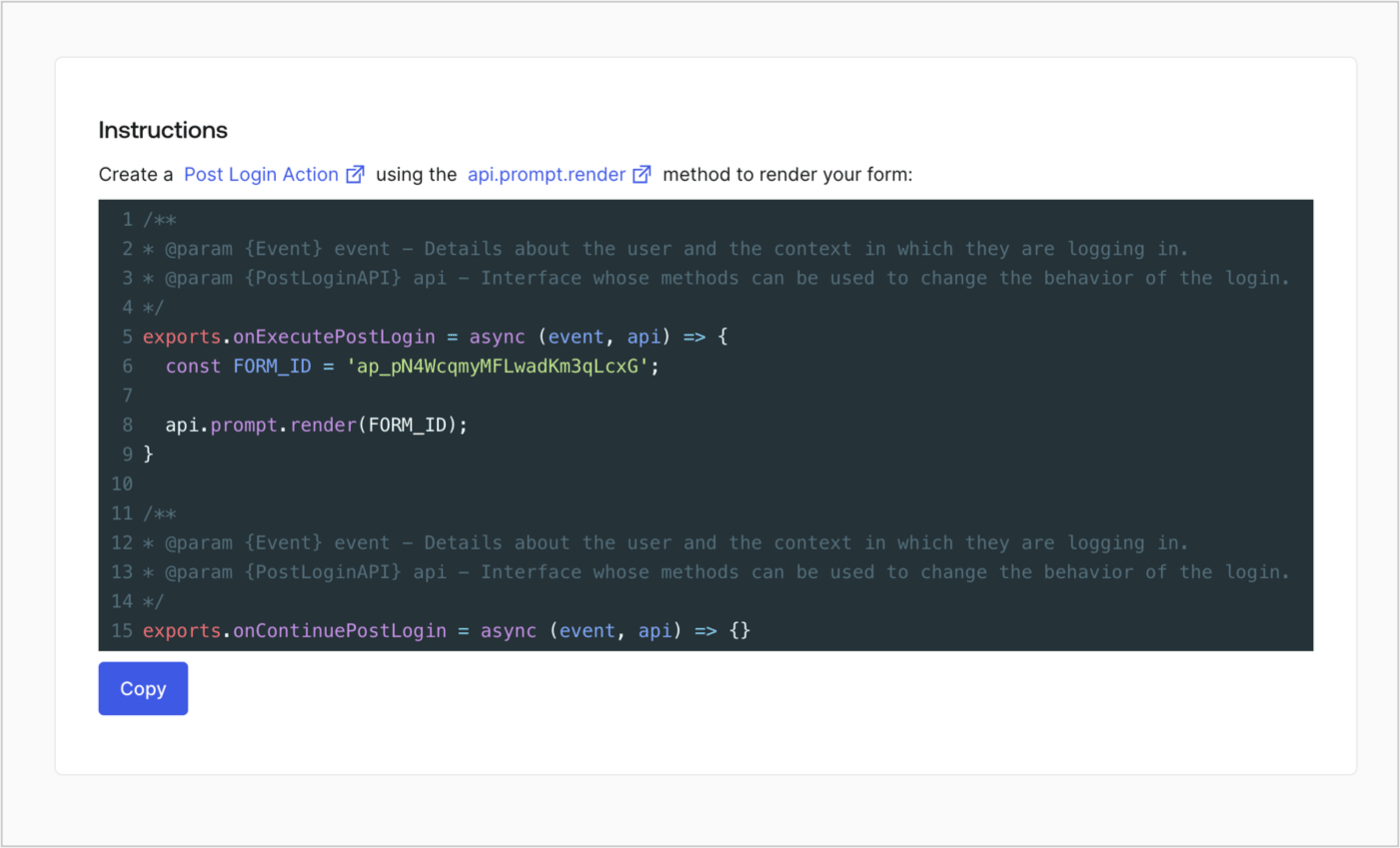
Retrieve your form render code to visually render the form with a custom Post Login Action by following these steps:

* From the Form editor, select **`<> Render`**.
* Select **Copy**.
<Frame>
  <img src="https://mintcdn.com/docs-dev-fix-update-domain-refs/dOhemvMetVDdyZ1C/docs/images/cdy7uua7fh8z/2EIUzc539sq9lwoTKbjoJv/496a864c0fc44a782c9cadca119dbfb0/embed.png?fit=max&auto=format&n=dOhemvMetVDdyZ1C&q=85&s=d2d7b939ff76a5cdae6e797ec1ee47e6" alt="Dashboard > Actions > Forms > Form > Embed" data-og-width="1400" width="1400" data-og-height="848" height="848" data-path="docs/images/cdy7uua7fh8z/2EIUzc539sq9lwoTKbjoJv/496a864c0fc44a782c9cadca119dbfb0/embed.png" data-optimize="true" data-opv="3" srcset="https://mintcdn.com/docs-dev-fix-update-domain-refs/dOhemvMetVDdyZ1C/docs/images/cdy7uua7fh8z/2EIUzc539sq9lwoTKbjoJv/496a864c0fc44a782c9cadca119dbfb0/embed.png?w=280&fit=max&auto=format&n=dOhemvMetVDdyZ1C&q=85&s=6f20485c7f36d450fbe5aaa73805fb5f 280w, https://mintcdn.com/docs-dev-fix-update-domain-refs/dOhemvMetVDdyZ1C/docs/images/cdy7uua7fh8z/2EIUzc539sq9lwoTKbjoJv/496a864c0fc44a782c9cadca119dbfb0/embed.png?w=560&fit=max&auto=format&n=dOhemvMetVDdyZ1C&q=85&s=2cf85525e706afa3f4dc1ffabe4d26de 560w, https://mintcdn.com/docs-dev-fix-update-domain-refs/dOhemvMetVDdyZ1C/docs/images/cdy7uua7fh8z/2EIUzc539sq9lwoTKbjoJv/496a864c0fc44a782c9cadca119dbfb0/embed.png?w=840&fit=max&auto=format&n=dOhemvMetVDdyZ1C&q=85&s=e61d36f3d339a5b7234e892f1fab38ec 840w, https://mintcdn.com/docs-dev-fix-update-domain-refs/dOhemvMetVDdyZ1C/docs/images/cdy7uua7fh8z/2EIUzc539sq9lwoTKbjoJv/496a864c0fc44a782c9cadca119dbfb0/embed.png?w=1100&fit=max&auto=format&n=dOhemvMetVDdyZ1C&q=85&s=737eb79fcbb38b62f8fc1f10f1e1e3d2 1100w, https://mintcdn.com/docs-dev-fix-update-domain-refs/dOhemvMetVDdyZ1C/docs/images/cdy7uua7fh8z/2EIUzc539sq9lwoTKbjoJv/496a864c0fc44a782c9cadca119dbfb0/embed.png?w=1650&fit=max&auto=format&n=dOhemvMetVDdyZ1C&q=85&s=da6290e9c81213c4fcb8f3e9a079f716 1650w, https://mintcdn.com/docs-dev-fix-update-domain-refs/dOhemvMetVDdyZ1C/docs/images/cdy7uua7fh8z/2EIUzc539sq9lwoTKbjoJv/496a864c0fc44a782c9cadca119dbfb0/embed.png?w=2500&fit=max&auto=format&n=dOhemvMetVDdyZ1C&q=85&s=1d33e85cfaa374716a7ffe6528b5dee5 2500w" />
</Frame>

## Create a Post Login Action

Create a post-login Action to render your form by following these steps:

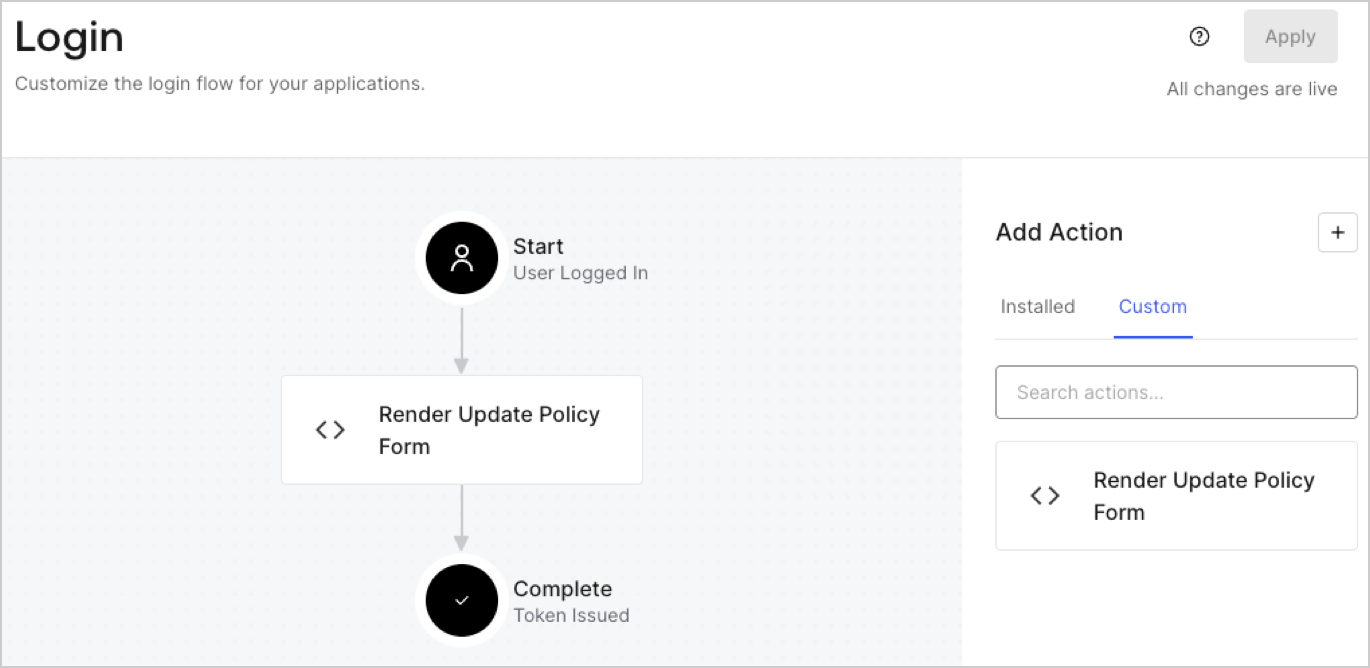
1. Navigate to **Auth0 Dashboard > Actions > Flows > Login.**
2. Select the **+** icon and Select **Build from scratch**:

   * **Name**: Enter `Render Update Policy Form`.
   * **Trigger**: Select `Login / Post Login`.
   * **Runtime**: Select the recommended version.
3. Select **Create**.

To configure the post-login Action:

1. Delete the existing code from the Code editor.
2. Paste the form render code into the Code editor.
3. Edit the code to define the conditional logic that will render the form.

   ```javascript lines theme={null}
   /**
   * @param {Event} event - Details about the user and the context in which they are logging in.
   * @param {PostLoginAPI} api - Interface whose methods can be used to change the behavior of the login.
   */
   exports.onExecutePostLogin = async (event, api) => {
     const FORM_ID = 'REPLACE_WITH_YOUR_FORM_ID';

     if (event.user.app_metadata.privacy_policies !== true) {
       api.prompt.render(FORM_ID);
     }
   }

   exports.onContinuePostLogin = async (event, api) => { }
   ```

   <Callout icon="file-lines" color="#0EA5E9" iconType="regular">
     The example code above will render the form when a user is missing the app metadata `privacy_policies` property.
   </Callout>
4. Select **Deploy.**
5. Drag and Drop the **Render Update Policy Form** Action to the **Login** flow.
   <Frame>
     <img src="https://mintcdn.com/docs-dev-fix-update-domain-refs/pMqDbypok7VJ6IAW/docs/images/cdy7uua7fh8z/5TOwDgevZsBqd7yZynUYWU/41ca909dc3007aed4f40ff794a05efa5/postlogin.png?fit=max&auto=format&n=pMqDbypok7VJ6IAW&q=85&s=dba12b8f0660229e7e9086145e4db02e" alt="Dashboard > Forms > Use Case > Render update policy form login action" data-og-width="1370" width="1370" data-og-height="668" height="668" data-path="docs/images/cdy7uua7fh8z/5TOwDgevZsBqd7yZynUYWU/41ca909dc3007aed4f40ff794a05efa5/postlogin.png" data-optimize="true" data-opv="3" srcset="https://mintcdn.com/docs-dev-fix-update-domain-refs/pMqDbypok7VJ6IAW/docs/images/cdy7uua7fh8z/5TOwDgevZsBqd7yZynUYWU/41ca909dc3007aed4f40ff794a05efa5/postlogin.png?w=280&fit=max&auto=format&n=pMqDbypok7VJ6IAW&q=85&s=8ac8d09b02b265d7a1391a55442049de 280w, https://mintcdn.com/docs-dev-fix-update-domain-refs/pMqDbypok7VJ6IAW/docs/images/cdy7uua7fh8z/5TOwDgevZsBqd7yZynUYWU/41ca909dc3007aed4f40ff794a05efa5/postlogin.png?w=560&fit=max&auto=format&n=pMqDbypok7VJ6IAW&q=85&s=56039e0b6061de14df58b4c212901d04 560w, https://mintcdn.com/docs-dev-fix-update-domain-refs/pMqDbypok7VJ6IAW/docs/images/cdy7uua7fh8z/5TOwDgevZsBqd7yZynUYWU/41ca909dc3007aed4f40ff794a05efa5/postlogin.png?w=840&fit=max&auto=format&n=pMqDbypok7VJ6IAW&q=85&s=cc86cb77b2d8e2b70f8b1f6a6f06998a 840w, https://mintcdn.com/docs-dev-fix-update-domain-refs/pMqDbypok7VJ6IAW/docs/images/cdy7uua7fh8z/5TOwDgevZsBqd7yZynUYWU/41ca909dc3007aed4f40ff794a05efa5/postlogin.png?w=1100&fit=max&auto=format&n=pMqDbypok7VJ6IAW&q=85&s=604ffa12d037388e89d880ab9679621d 1100w, https://mintcdn.com/docs-dev-fix-update-domain-refs/pMqDbypok7VJ6IAW/docs/images/cdy7uua7fh8z/5TOwDgevZsBqd7yZynUYWU/41ca909dc3007aed4f40ff794a05efa5/postlogin.png?w=1650&fit=max&auto=format&n=pMqDbypok7VJ6IAW&q=85&s=24df129a6ac112a5f778ac1b72c971c4 1650w, https://mintcdn.com/docs-dev-fix-update-domain-refs/pMqDbypok7VJ6IAW/docs/images/cdy7uua7fh8z/5TOwDgevZsBqd7yZynUYWU/41ca909dc3007aed4f40ff794a05efa5/postlogin.png?w=2500&fit=max&auto=format&n=pMqDbypok7VJ6IAW&q=85&s=769717fae4ed1455f45a2e725ccc8b1e 2500w" />
   </Frame>
6. Select **Apply.**

### Test implementation

Test the implementation by following these steps:

1. Log in with an existing user whose app`_metadata` attribute `privacy_policies` does not have a value.
2. The post-login Action in the Login flow will render the form and prompt for acceptance.
3. Select **Auth0 Dashboard > User Management > Users,** locate the user and verify that the `app_metadata` attribute `privacy_policies` contains a `true` value and a timestamp.
